Dashboard
The monitoring service (festin-serve) ships a single-page application — an industrial ops console: monospace type, warm dark palette, amber signal color. Everything is keyboard-free, click-driven, and refreshes itself.
Concepts
| Concept | Meaning |
|---|---|
| Project | A named container for domains (prod-assets, research…). Every domain and scan belongs to exactly one project. A default project exists and can't be deleted. |
| Domain | A target host inside a project. |
| Scan | One execution of the scanner against a domain. Statuses: [QUEUED] → [RUNNING] → [DONE] / [FAIL]. |
| Finding | A secret or sensitive datum found inside a bucket object, with severity CRIT / HIGH / MED / LOW. |
| Bucket | An S3 bucket discovered, with its object count. |
Roles
| Capability | Viewer | Admin |
|---|---|---|
| See projects, scans, findings, buckets |  | |
| Run scans | | |
| Create/edit/delete projects |  | |
| Add/remove domains | | |
| Manage scheduled scans | | |
| Create users, change roles, delete users | | |
The first account registered on an empty database becomes admin (bootstrap). Your own role selector is disabled in the Users view — self-demotion would lock you out.
Views
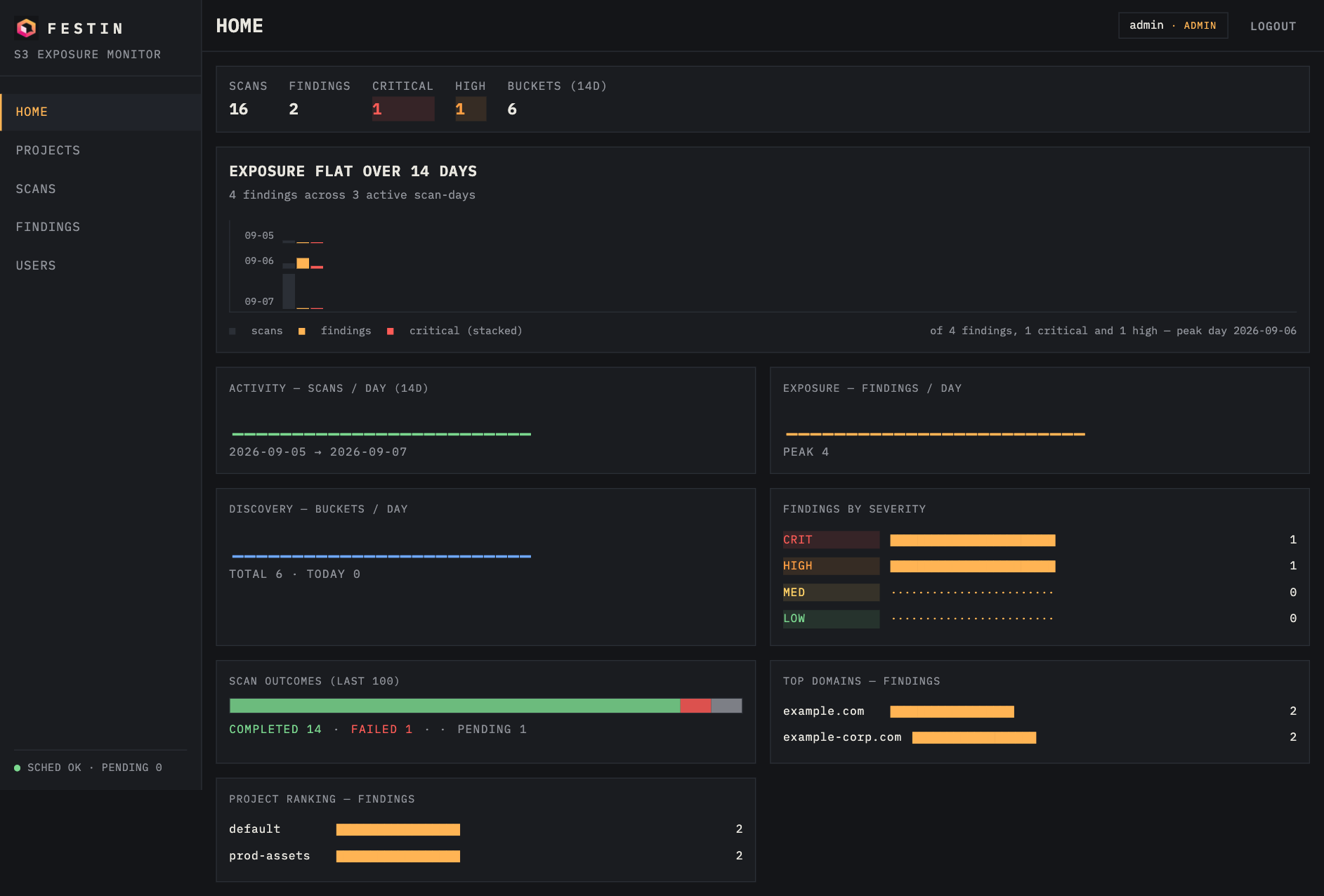
HOME
The command deck.
- Counter strip: total scans, findings, critical, high, buckets (14d).
- EXPOSURE TREND (hero): full-width chart of scans/findings/critical per day with a data-generated headline — EXPOSURE TRENDING DOWN 34% SINCE 09-05, or FLAT, or UP. The subtitle and footnote tell the story of the window.
- Activity / Exposure / Discovery: 14-day sparklines.
- Findings by severity: proportional bar chart.
- Scan outcomes: stacked bar of the last 100 scans by status.
- Top domains and Project ranking by findings.
PROJECTS
All projects with domain/scan/finding counts and last-scan time. Click a row to open the project.
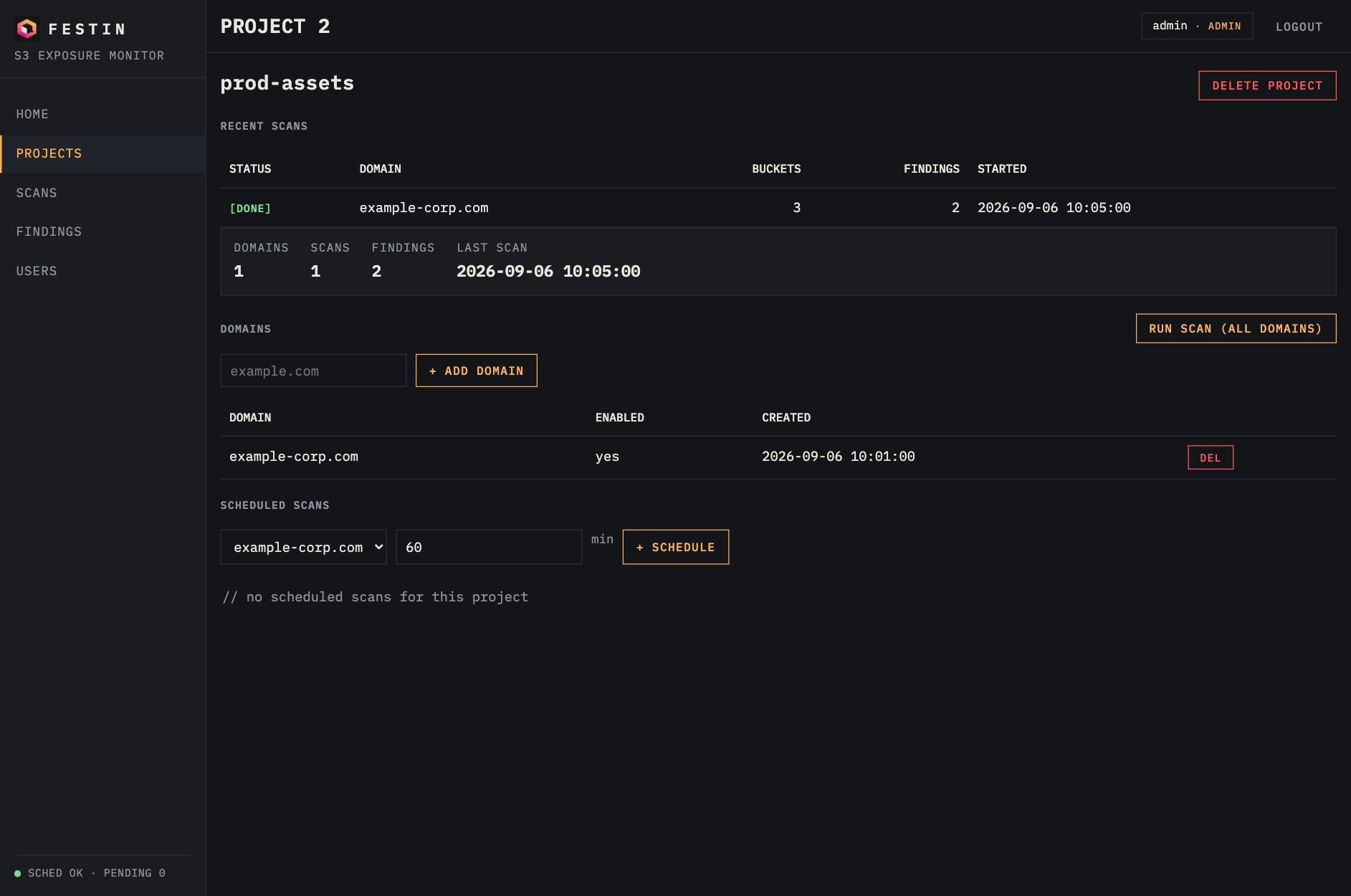
PROJECT detail
- Recent scans for the project.
- Domains table with + ADD DOMAIN and DEL.
- RUN SCAN (ALL DOMAINS) — queues a scan for every domain in the project.
- Scheduled scans —
+ SCHEDULEsets a per-domain interval (minutes); the scheduler loop fires due scans every 10 s.
SCANS
Global scan table with project and status filters. Click a scan for its detail: bucket list, findings with rule, severity, line and redacted match.
FINDINGS
Every finding across projects, filterable by severity.
USERS (admin)
Create users, flip roles inline (select viewer/admin), delete. Guards: you can't delete yourself, the last admin can't be deleted, and you can't demote yourself.
Conventions you'll recognize
| Token | Meaning |
|---|---|
[QUEUED] | scan accepted, waiting for a worker slot |
[RUNNING] | scanner executing (pulses) |
[DONE] | completed |
[FAIL] | crashed — check the server logs |
CRIT HIGH MED LOW | finding severity |
Destructive actions (delete project/domain/scan/user) use a two-step arm pattern: the button first turns into confirm?; click again within 3 seconds to execute. No browser dialogs are used anywhere.
The scheduler
- A loop ticks every 10 seconds inside the service process.
- Each scheduled domain fires when
now - last_run >= interval. last_runtracking is in-memory: after a restart, all schedules fire once on the first tick.- Scans run as asyncio background tasks in the same process (see architecture for the scaling story).